Scan-to-BIM modelling, delivered to your specification.
Send a registered point cloud. Get back native Revit, IFC or DWG at the LOD you specify, checked against the scan and ready to issue under your name.

Scan: the registered point cloud, before any modelling.
40,431 points shown
- You send
- Registered point clouds from any scanner
- You get
- RVT, IFC and DWG on your own template
- Checked
- A deviation report with every model
Capture takes a day. Modelling takes the month.
Your crews can capture and register a site in a day or two. Then the scan waits for modelling time, because modelling is where the hours go: every wall, duct, pipe and pump traced from the points by hand, then checked, then fixed.
Most survey firms have three ways to handle the queue:
Baserton is a fourth way: we do the modelling, to your standard and behind your name. You keep the scanner, the client and the invoice.
What you send
| Item | What we need |
|---|---|
| Point cloud | Registered scans from any scanner, including Leica, FARO, Trimble, NavVis and Z+F. E57, RCP/RCS, LAS/LAZ or PTS. |
| Scope | The area, the element categories and the LOD for each. Add an LOA band if your contract specifies one. |
| Your standards | Your Revit template, families, naming and title block, so the model drops straight into your deliverable. |
| Site context | Photos, field notes and any existing drawings. Optional, always useful. |
| Transfer | A share link from your own storage, or an upload link from us. Large files are expected. |
What comes back
Native Revit
Built on your template, with your families, worksets and naming. Opens in Revit as if your own team had modelled it.
Open BIM
For coordination, model checking and clients who work outside Revit.
Drawings
Plans, sections and elevations cut from the model, on your title block.
You set the level of development for each category
| LOD | What is modelled | Typical use |
|---|---|---|
| 200 | Generic elements at approximate size, shape and position. | Space planning, early feasibility |
| 300 | Specific elements at their measured size, shape, position and orientation. | Design, coordination, as-built record |
| 350 | LOD 300 plus the connections, supports and interfaces between elements. | Trade coordination, clash detection |
LOD terms follow the BIMForum Level of Development Specification. If your contract defines levels differently, send the definition with the scope and we model to it. Fig. 0 steps a real scan through LOD 100 to 300.
Plant rooms, production lines and process equipment
Most scan-to-BIM work stops at walls, floors, ducts and pipes. Equipment-heavy sites are where modelling hours pile up, and we take them on as standard: manifolds, conveyors, skids, tanks, racking and the pipework between them, each modelled as its own object with its own schedule entry.
| Drawing | Tag | Element | Count | Modelled as |
|---|---|---|---|---|
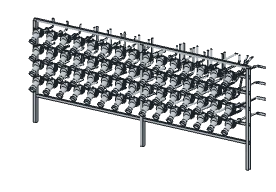 | EQ-01 | Process manifold | 1 | Frame and 60 outlets in four rows |
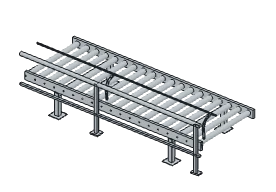 | EQ-02 | Roller conveyor, straight run | 1 | Frame, legs and 56 rollers |
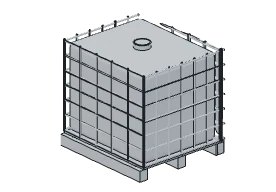 | EQ-03 | IBC tote, caged | 35 | Pallet, cage, tank and cap |
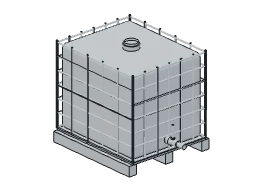 | EQ-04 | IBC tote with valve outlet | 9 | Pallet, tank, valve and handle |
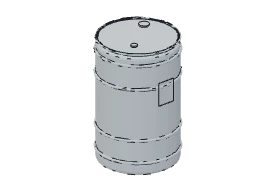 | EQ-05 | Steel drum | 5 | Body, rolling hoops and lid |
Every element checked against the points
Before a model ships, we compare it with the scan it came from. The deviation report lists every element: how many points support it, how far the model sits from them, and anything we had to infer rather than measure, such as a face hidden behind equipment. You see the evidence before your client does.
| Column | What it tells you |
|---|---|
| Element | Each modelled element, by the tag and name it has in your model. |
| Points | How many scan points support it. |
| Median, 95th pct. | The distance from those points to the model surface, in millimetres. |
| Against spec | The element checked against the tolerance band in your scope: within, review or inferred. |
| Inferred | Faces with no points behind them, such as a wall hidden by a panel. They are modelled where you need them and always flagged. |
Your title block. Your client.
We don't scan, we don't bid and we never contact your client. Models arrive on your template, with your naming and your title block, ready to issue as your own work. How your data is handled is agreed with you before any scan moves.
Send one scan. Judge us on your own data.
- Day 0
Send one completed, registered scan: a floor or a plant area. Include your template and the LOD you would specify for the job.
- Within 48 hours
The model and its deviation report come back at that LOD, in your formats, on your template.
- After that
If it meets your standard, we quote your next job from the scan and the scope, so you can price your bid with real numbers.
Book a scoping call
Twenty minutes to agree the pilot scope, the LOD and how the scan reaches us.
Calendar not loading? Open the booking page.
Notes
- Do you scan sites?
- No. We model scans you have already captured, so the site visit and the client relationship stay yours.
- Which LOD and LOA can you work to?
- You set the LOD for each element category (clause 3). If your contract specifies LOA bands, tell us and the deviation report is checked against them (clause 5).
- What state should the scan be in?
- Registered and cleaned the way you would hand it to your own modellers.
E57is the easiest to work with; the formats in clause 2 all work. - How do large scans reach you?
- By link: a share from your own storage, or an upload link we send you. Large files are expected.
- Can you match our standards?
- Yes. Send your template, families, naming and title block with the pilot and the model is built on them.
- How is a job priced?
- Per job, from the scan and the scope. The pilot gives you real numbers to price your bid with.
- What happens to our data?
- That is agreed with you before any scan moves.